🛡 API Guard
Rate limit · Bot detect · Geo
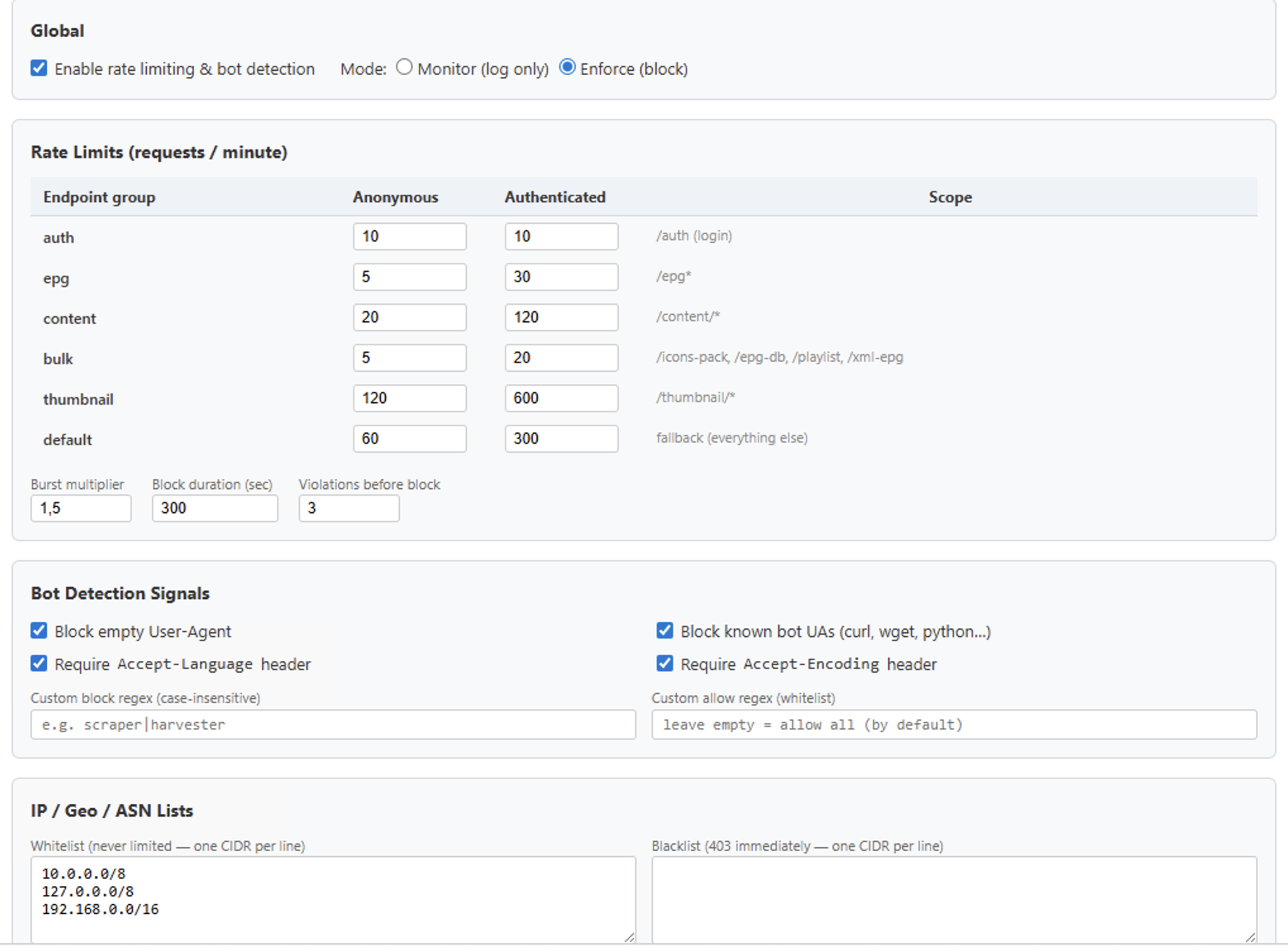
🛡 IPTV API Protection — Rate Limiting & Bot Detection
Architecture
Burst multiplier (default 1.5×) allows short spikes — e.g. content auth limit 120 → burst ceiling 180/min.
Modes — Monitor vs Enforce
monitor
but passes the request through
enforce
Bot Detection Signals
Empty User-Agent — blocks clients that don't identify themselves.
Known bot UA substrings — matches curl, wget, python-requests, python-urllib, go-http-client, httpie, java-http-client, okhttp, apache-httpclient, bot, crawler, spider, scraper (case-insensitive).
Missing Accept-Language — real browsers always send it; most scripts don't.
Missing Accept-Encoding — same as above.
Custom block regex — your own pattern (case-insensitive) e.g. scraper|harvester|probe.
Custom allow regex — if set, ANY UA that doesn't match is rejected (strict allowlist).
If a specific integration can't send a normal UA (e.g. a legitimate background job), whitelist its IP instead of relaxing bot signals globally.
IP / Geo / ASN Lists
Blacklist — CIDRs that get 403 immediately, no counter spent. Useful for persistent offenders.
Blocked countries — ISO-2 codes resolved via local GeoIP. Empty = no geo block.
Blocked ASNs — hosting / VPN providers (e.g. AS14061 Digital Ocean, AS16509 Amazon). GeoIP-resolved.
Redis Key Reference
Operational Runbook
First-time enable: set mode = monitor, enable rate limiting. Wait 24–48 h.
Review telemetry: sparkline shows when would-be-429 spikes occur; Top-10 offenders table shows repeat offenders. Adjust limits if legitimate users are hitting them.
Enforce soft: set mode = enforce with limits 2× higher than target. Watch the sparkline + support channel for 2–3 days.
Enforce final: tighten limits to production values. Keep violations_before_block at 3 (default) to absorb occasional spikes.
Incident response: IP attacks → add to Blacklist textarea and save (propagates to nginx in ≤5 s via Redis).
Unblock false positive: IPTV Settings → Security → Top offenders → Unblock. Clears rl:blocked:{ip} + rl:violations:{ip}.
Implementation Files
Persisted Config Keys (iptv_defaults)
All stored under prefix sec.*. Saved on every UI click.
Security Configuration
Overview
Stream Manager uses UFW (Uncomplicated Firewall) for network access control and fail2ban for intrusion prevention. Together they protect the server from unauthorized access and brute-force attacks.
UFW Firewall
UFW controls which network traffic is allowed to reach the server.|Default rules: HTTP (80), HTTPS (443), and Media Server (8080) are open to all. SSH (22) is restricted to internal and CDN networks only.|Multicast traffic (224.0.0.0/4) is restricted to trusted source networks.|Manage rules from Config > Security tab, or via command line with 'sudo ufw'.
fail2ban Intrusion Prevention
fail2ban monitors log files for repeated authentication failures and automatically bans offending IP addresses.|The sshd jail protects SSH access by banning IPs after multiple failed login attempts.|Uses nftables backend for efficient packet filtering.|Banned IPs can be manually unbanned from Config > Security tab.
Multicast Routing Restrictions
Multicast traffic (224.0.0.0/4) is restricted to two trusted networks:|10.0.0.0/8 - Internal network for local stream sources and management.|147.78.168.0/22 - CDN network for edge server distribution.|This prevents unauthorized multicast sources from injecting traffic into the streaming pipeline.
CDN Network Architecture
The CDN network (147.78.168.0/22) is used for distributing streams to edge servers.|SSH access is allowed from CDN IPs for remote management.|Multicast forwarding is enabled between internal and CDN networks.|All other traffic from CDN follows standard firewall rules.
Best Practices
Keep UFW enabled at all times|Restrict SSH access to known networks only|Monitor fail2ban jails regularly for attack patterns|Use strong passwords and key-based SSH authentication|Review firewall rules periodically and remove unused entries|Keep fail2ban and UFW packages updated